Description
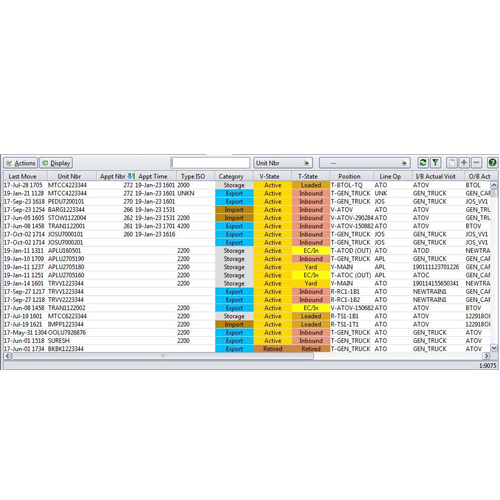
Currently there is no option to view Appointment time and number for Units that is going to be received in units table, only for units that is going to be delivered is having appointment time and number details in unit table. The appointment time and number can be viewed for the units that is going to be received can be viewed in units tabled using the code extension and groovy plugin available. This will help the user to know when and at what time slot a respective unit is going to arrive in terminal.
Scenarios
There are a couple of ways in which a ‘Gate Appointment’ can be created. The first scenario falls when the user knows exactly for which ‘Unit’ appointment is being created and creates an appointment by providing an equipment unit number along with other details. In this case, the unit number should exist in the Units table (A unit details will exist in the table when it already used the Unit Facility earlier). The moment the appointment is created, the groovy will get triggered and store the appointment time and number in units table.
Hence, in the above scenario, groovy can make use of the unit details and the newly created appointment time and number and display in the respective columns in the units table.
The second scenario will occur either when the unit never visited the facility earlier or the user doesn’t know the unit number for which appointment is being created. In this case, appointment can be made based on the truck. After the appointment creation, status of appointment will be ‘APP_CREATED’. After that, User need to make a gate transaction so that the status of the appointment should be “APP_USED”. Once the status is “APP_USED”


Reviews
There are no reviews yet.